An ERP system often sits at the center of a business.
It may contain information about customers, products, inventory, orders, purchasing, finance, fulfilment, and other critical business processes.
But modern businesses rarely operate using an ERP alone.
An organization may also rely on:
The challenge is connecting these systems so that information can move between them reliably, securely, and efficiently.
This is where ERP integration becomes critical.
A poorly designed integration can create duplicate data, synchronization failures, fragile dependencies, performance problems, security risks, and long-term technical debt.
A well-designed integration architecture does the opposite.
It creates a connected technology ecosystem where systems exchange information reliably while remaining independently maintainable.
This article explores the most important ERP integration best practices—from API architecture and data synchronization to security, error handling, scalability, monitoring, and long-term maintainability.
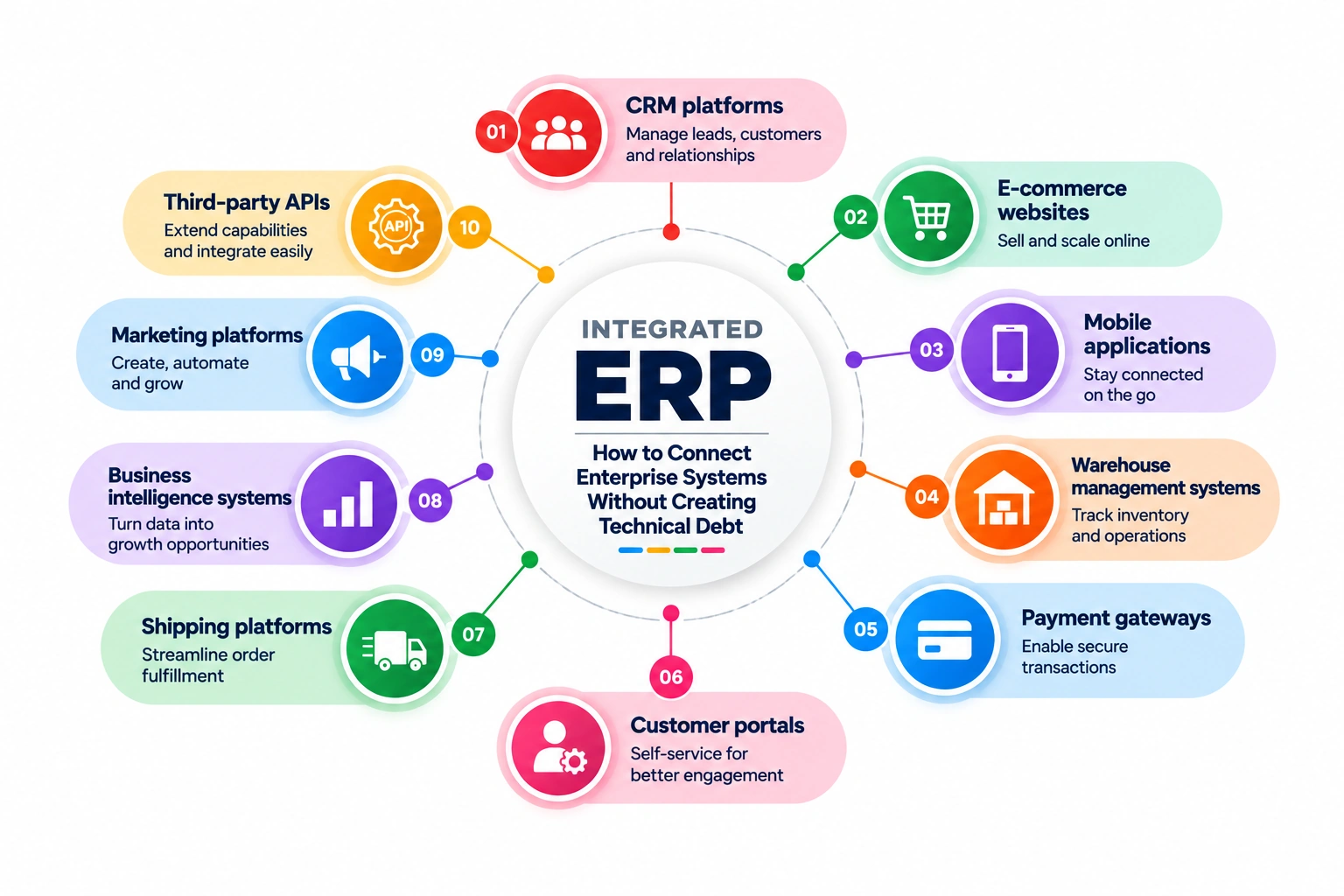
ERP integration is not simply about connecting two systems with an API.
A production-grade integration needs to answer several important questions:
A typical enterprise integration architecture might look like this:
              ┌──────────────┐
              │     ERP      │
              └──────┬───────┘
                     │
                     ▼
             Integration Layer
                     │
          ┌──────────┼──────────┐
          ▼          ▼          ▼
        CRM       E-Commerce   WMS
          │          │          │
          └──────────┼──────────┘
                     ▼
              Business APIs
                     │
                     ▼
             Applications /
             Dashboards /
             Mobile Apps
The exact architecture depends on the ERP platform, transaction volumes, business requirements, latency expectations, and number of connected systems.
But one principle remains consistent:
An ERP integration should be designed as a long-term software architecture—not as a one-time API connection.
ERP integration is the process of connecting an ERP platform with other applications so that systems can exchange business data and coordinate workflows.
For example:
E-Commerce
    │
    ▼
   ERP
    │
    ├── Inventory
    │
    ├── Orders
    │
    ├── Customers
    │
    └── Finance
          │
          ▼
      Reporting
A customer placing an order on an e-commerce website may trigger several processes:
Without integration, these processes may require manual intervention.
With integration, they can become automated.
At first glance, integration appears straightforward:
System A → API → System B
Real-world integrations are rarely this simple.
Consider an order synchronization process.
What happens if:
These scenarios are where integration architecture becomes important.
The objective isn’t simply to make the happy path work.
The objective is to make the entire system reliable when things go wrong.
One of the most important ERP integration decisions is determining which system owns each piece of information.
For example:
| Data | Possible System of Record |
|---|---|
| Product master | ERP |
| Inventory | ERP / WMS |
| Customer profile | CRM / ERP |
| Order | E-commerce / ERP |
| Payment | Payment platform |
| Shipment | Shipping platform |
| Financial transaction | ERP |
Without clear ownership, systems can overwrite each other’s data.
Imagine an inventory quantity exists in both an e-commerce database and the ERP.
Which value is correct?
If both systems independently modify inventory, inconsistencies become inevitable.
Every important business entity should have a clearly defined source of truth.
Integration should synchronize information—not create competing versions of reality.
Key Takeaway: Before writing integration code, define ownership of every critical data entity.
A common mistake is to design an integration around available API endpoints.
For example:
“The ERP provides a Customer API, so we’ll synchronize customers.”
That is technically reasonable but incomplete.
The real question is:
“What business process requires customer synchronization?”
Perhaps the actual workflow is:
Customer Registration
       ↓
CRM
       ↓
Customer Validation
       ↓
ERP
       ↓
Customer Account Creation
       ↓
E-Commerce
Understanding the workflow determines:
Business processes should drive integration architecture.
APIs are implementation mechanisms.
There is no single correct integration pattern.
The right approach depends on the business requirement.
Data is exchanged immediately when an event occurs.
Order Created
     ↓
Integration
     ↓
ERP
Useful for:
Data is synchronized periodically.
ERP
 ↓
Every 15 Minutes
 ↓
Application
Useful when immediate updates are not necessary.
A business event triggers downstream processing.
Order Created
      ↓
   Event
      ↓
 ┌────┴─────┐
 ▼          ▼
ERP       Analytics
This can provide greater scalability and decoupling for complex environments.
Not every business process needs millisecond-level synchronization.
Forcing real-time integration everywhere can increase complexity and infrastructure costs unnecessarily.
The right question is:
How fresh does this data actually need to be?
One of the strongest architectural practices is introducing a dedicated integration layer rather than connecting every system directly to every other system.
Without an integration layer:
ERP ───── CRM
 │  \     / │
 │   \   /  │
 │    \ /   │
WMS ─ E-Commerce
As systems increase, the number of connections can grow rapidly.
A centralized integration layer simplifies the architecture:
          ERP
           │
           ▼
    Integration Layer
      /     │      \
     ▼      ▼       ▼
   CRM     WMS   E-Commerce
This provides a controlled location for:
It also reduces coupling between systems.
APIs form the foundation of many modern ERP integrations.
A well-designed integration should establish clear contracts for:
Consider an order payload:
{
  "orderId": "ORD-10025",
  "customerId": "CUST-2045",
  "items": [
    {
      "productId": "PROD-100",
      "quantity": 2
    }
  ]
}
The structure may appear simple, but the integration must define what happens when:
API contracts should explicitly define these scenarios.
Idempotency is one of the most important concepts in reliable integration architecture.
Suppose an application sends an order to an ERP.
The ERP receives the request successfully, but the network connection fails before the application receives the response.
The application doesn’t know whether the order was created.
It retries.
If the integration isn’t idempotent, the ERP may create the order twice.
An idempotent integration can recognize that the operation has already been processed.
A common strategy is using a unique business identifier:
External Order ID
       ↓
Integration
       ↓
Check Existing Record
       ↓
Already Exists?
    /        \
  Yes         No
   ↓           ↓
Skip        Create
This prevents duplicate processing and is particularly important for orders, payments, invoices, and other transactional operations.
In distributed systems, you must assume that messages can be delivered more than once.
Design accordingly.
External systems fail.
ERP APIs may become unavailable.
Networks can experience temporary failures.
Authentication services can time out.
A reliable integration should distinguish between temporary and permanent failures.
Examples:
These may be retried.
Examples:
Retrying these repeatedly does not solve the problem.
Instead, they should be recorded for investigation or correction.
A typical retry strategy might look like:
Integration Request
        ↓
      Failed
        ↓
Temporary?
   /          \
 Yes           No
  ↓             ↓
Retry       Error Queue
  ↓
Success
Retries should generally use controlled backoff rather than immediately sending repeated requests.
When transaction volume increases, synchronous API calls can become a bottleneck.
Consider an e-commerce system receiving thousands of orders during a major sale.
If every order waits synchronously for ERP processing:
Order
  ↓
ERP API
  ↓
Response
  ↓
Customer
A slow ERP can cause the entire customer experience to slow down.
An asynchronous architecture can decouple the systems:
Order
  ↓
Queue
  ↓
Integration Worker
  ↓
ERP
The order can be accepted by the application while integration processing happens independently.
This improves resilience and scalability.
However, asynchronous processing introduces additional considerations such as:
Again, architecture must follow business requirements.
ERP integrations frequently require privileged credentials.
These credentials should never be:
Instead, organizations should use secure secret-management approaches appropriate to their infrastructure.
Security should also cover:
Sensitive customer and financial information requires additional consideration.
An integration is effectively a bridge between systems.
If that bridge is poorly secured, compromising one application may provide an attacker with a path into another.
Integration security must therefore be treated as part of the overall enterprise security architecture.
Data quality problems frequently become integration problems.
Imagine an e-commerce system sends:
Customer:
John Smith

Country:
United States

Phone:
Invalid Format
The ERP rejects the record.
The integration fails.
Now the business needs someone to investigate manually.
Validation should happen as early as practical.
This may include:
Good validation reduces downstream failures and makes error messages more actionable.
ERP integration often involves synchronizing the same business entities across multiple systems.
This introduces the challenge of eventual consistency.
Suppose inventory is updated in the ERP.
The e-commerce platform may not receive the update immediately.
For a short period:
ERP Inventory:        8
E-Commerce Inventory: 10
This isn’t necessarily a system failure.
It may be an expected consequence of asynchronous synchronization.
The architecture must therefore define:
For critical business processes, these rules should be explicitly documented.
An integration that fails silently is one of the most dangerous types of software.
Imagine an order fails to synchronize with the ERP.
If nobody knows about it, the problem may remain hidden for hours.
Production integrations should provide visibility into:
A useful operational dashboard might show:
ERP Integration Health

Orders Processed       12,845
Successful             12,801
Pending                    32
Failed                     12
Average Response        420 ms
Last Sync               10:42:31
This turns integration from a black box into an observable business process.
Logs are essential for troubleshooting.
But logging everything can create security and compliance problems.
Integration logs should provide enough information to reconstruct failures without unnecessarily exposing sensitive data.
Useful information may include:
Sensitive values should be masked where appropriate.
For example:
Transaction: ORD-10025
Operation: CreateOrder
Status: Failed
Error: ERP_TIMEOUT
Correlation ID: 7f81...
This is much more useful than:
Something went wrong.
When one business transaction passes through several systems, troubleshooting becomes difficult without a common identifier.
Consider:
E-Commerce
     ↓
Integration API
     ↓
ERP
     ↓
Warehouse
     ↓
Shipping
A correlation ID can travel with the transaction:
Correlation ID: 7F81-ORD-10025
Engineers can then trace the transaction across multiple services and logs.
This dramatically reduces troubleshooting time.
Third-party and ERP APIs may impose rate limits.
For example:
100 requests/minute
If an application suddenly sends 500 requests, the ERP may reject the majority.
Integration architecture should therefore account for:
Ignoring these constraints can cause an integration to work perfectly in development and fail under production load.
ERP platforms and third-party systems evolve.
API versions change.
Fields are deprecated.
Authentication mechanisms are updated.
Business rules change.
A tightly coupled integration can break when the external system changes.
API versioning and abstraction can reduce this risk.
For example:
Application
     ↓
Internal Integration Contract
     ↓
ERP Adapter
     ↓
ERP API v2
If the ERP later changes its API, the adapter can absorb the change without requiring the entire application to be rewritten.
This is an important strategy for reducing long-term technical debt.
Even well-designed integrations can encounter inconsistencies.
That is why reconciliation is important.
For example, a daily reconciliation process could compare:
ERP Orders
     vs
E-Commerce Orders
and identify:
Reconciliation provides a safety net for distributed systems.
Successful API responses do not always mean successful business processes.
A transaction may technically succeed while the resulting business state is still incorrect.
Reconciliation helps detect those gaps.
Putting these principles together, a scalable integration architecture could look like this:
 ┌─────────────┐
 │ E-Commerce  │
 └──────┬──────┘
        │
 ┌──────▼──────┐
 │     CRM     │
 └──────┬──────┘
        │
        ▼
┌──────────────────────┐
│  Integration Layer   │
│                      │
│ Validation           │
│ Transformation       │
│ Authentication       │
│ Business Rules       │
│ Idempotency           │
│ Retry Handling       │
│ Logging              │
└──────────┬───────────┘
           │
     ┌─────┴─────┐
     ▼           ▼
   Queue       Direct API
     │           │
     └─────┬─────┘
           ▼
     ┌───────────┐
     │    ERP    │
     └─────┬─────┘
           │
           ▼
     Inventory / WMS /
       Reporting
This architecture provides clear separation between business applications and the ERP platform.
The actual implementation can be simpler or more sophisticated depending on the organization’s requirements.
Connecting every application directly to every other application creates a tightly coupled environment that becomes difficult to maintain.
If multiple systems believe they own the same entity, synchronization conflicts are inevitable.
Distributed systems can deliver messages more than once. Idempotency is essential.
Temporary failures should not immediately become permanent business failures.
Invalid data won’t become valid simply because the request was sent again.
If failures aren’t visible, they cannot be resolved quickly.
Integration secrets require secure management.
External APIs change. Your architecture needs to accommodate that reality.
Not every integration requires microservices, queues, event streaming, and multiple infrastructure components.
Use the simplest architecture that reliably satisfies the business requirement.
A practical decision framework is:
| Requirement | Potential Approach |
|---|---|
| Small data volume | Direct API integration |
| Periodic synchronization | Scheduled jobs |
| Immediate business updates | Real-time APIs/events |
| High transaction volume | Queue-based processing |
| Multiple connected systems | Dedicated integration layer |
| Complex workflows | Event-driven architecture |
| Large analytical workloads | Separate reporting/analytics layer |
| Critical transactions | Idempotency + retry + reconciliation |
There is no universal ERP integration architecture.
The correct approach depends on:
Good integration architecture creates benefits far beyond technical efficiency.
It can help businesses:
Information flows automatically between systems.
Reducing duplicate manual entry can reduce data inconsistencies.
Business users can access current information across systems.
Orders, inventory updates, customer information, and other workflows can move automatically.
Customers receive more accurate information about orders, inventory, and fulfilment.
A scalable integration architecture allows transaction volumes and connected systems to increase without requiring a complete redesign.
An integration may start with a simple requirement:
“Send orders from our website to the ERP.”
Six months later, the business may want:
The integration architecture therefore needs to anticipate reasonable future requirements without unnecessarily overengineering the initial solution.
The goal is evolutionary architecture.
Build what the business needs today while creating sensible boundaries that allow the platform to grow tomorrow.
ERP integration is one of those areas where a solution can appear simple from the outside while containing significant engineering complexity underneath.
A successful integration requires more than connecting APIs.
It requires clear data ownership, well-defined business processes, appropriate synchronization strategies, secure authentication, robust error handling, idempotency, retry mechanisms, monitoring, reconciliation, and an architecture designed for change.
The best ERP integrations are almost invisible to business users.
Orders move automatically.
Inventory stays synchronized.
Customer information flows between systems.
Operational teams have accurate information.
Failures are detected before they become major business problems.
That is the real measure of integration success.
At Space Stem, we approach ERP integration as an engineering and business architecture challenge—not simply an API development task. By combining enterprise application development experience with scalable integration patterns, we help businesses connect ERP, CRM, e-commerce, inventory, warehouse, and other systems into reliable digital ecosystems.
The objective isn’t to connect more systems.
It’s to create a connected business that works better.
