Artificial intelligence is changing more than the features inside software applications. It is changing how applications themselves are designed.
For years, most business applications followed a relatively predictable architecture:
User → UI → Application → API → Database.
AI introduces another layer.
Applications may now need to understand natural language, retrieve enterprise knowledge, reason over data, use tools, interact with APIs, maintain context, generate recommendations and, in some cases, take controlled actions.
This does not mean traditional software architecture is disappearing. It means AI is becoming a first-class architectural component alongside the application, database, APIs, security and business rules.
That shift is creating a new architectural approach: AI-native software architecture.
An AI-native application is not simply a traditional application with a chatbot added to it. It is an application designed to combine deterministic software with probabilistic AI in a controlled, observable and useful way.
For businesses, the important question is: how should we architect software today so that it can take advantage of AI without creating an unreliable, insecure or unmaintainable system tomorrow?
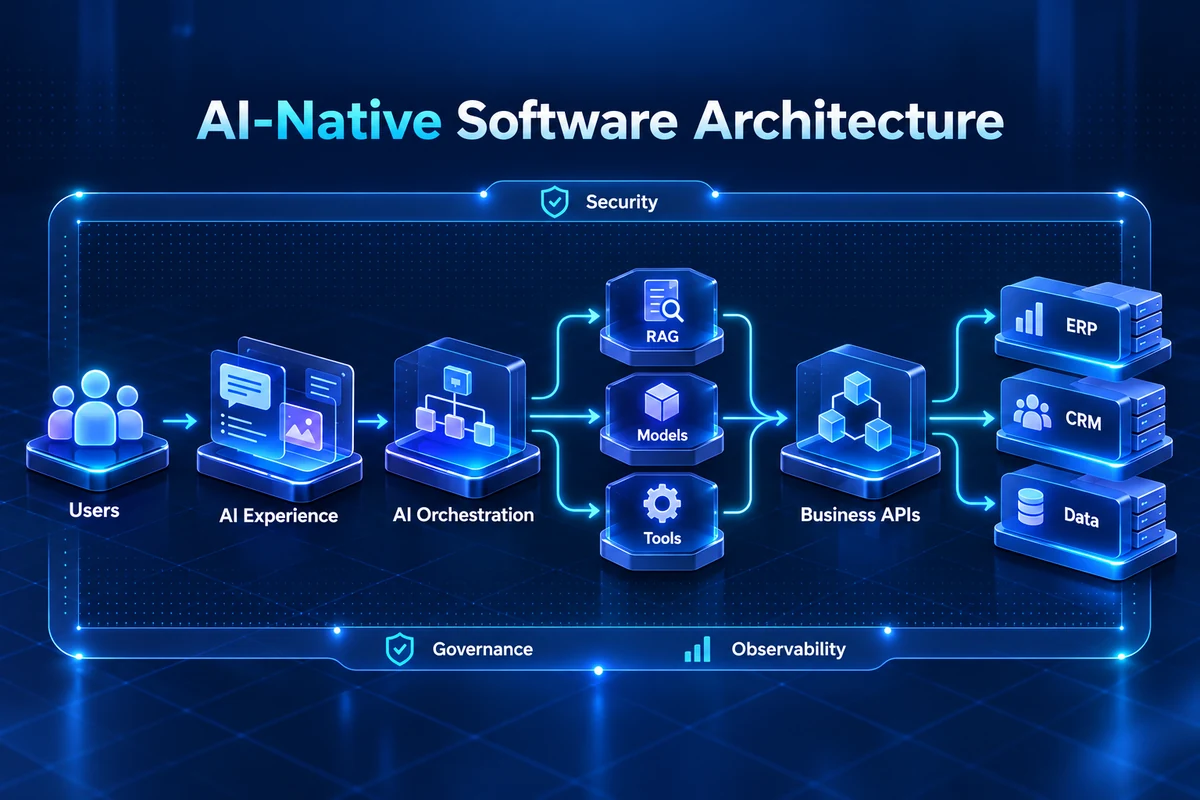
AI-native architecture combines conventional software engineering with AI capabilities such as large language models, retrieval, tool use, orchestration, agents and intelligent decision support.
A practical AI-native architecture typically includes:
The goal is not to replace deterministic software with AI. The goal is to place AI where it creates value while keeping critical business logic, permissions and controls explicit and testable.
AI-native software architecture is an application architecture in which AI is treated as a core capability rather than an optional add-on.
A traditional application may use AI for one feature, such as document summarization. An AI-native application may use AI throughout the user experience and workflow: understanding requests, retrieving information, reasoning over context, selecting tools, generating responses and coordinating actions.
AI-native does not mean AI everywhere. It means AI is deliberately integrated into the architecture wherever probabilistic intelligence provides value.
Traditional software is primarily deterministic. Given the same inputs and rules, the application generally produces predictable behavior.
AI systems introduce probabilistic behavior. That creates a hybrid architecture.
Traditional layer:
The strongest enterprise architectures do not force one layer to replace the other. They define clear responsibilities between them.
One of the most important architectural principles is knowing what AI should and should not control.
For example, an AI model may recommend a discount. The pricing engine should still determine whether that discount is permitted.
An AI agent may recommend a refund. The transaction service should still enforce refund limits and authorization.
AI can provide intelligence. Deterministic software should continue to enforce critical business rules. This separation improves reliability, testability and security.
In an AI-native system, the model is not simply an external API called from one controller.
The architecture may contain:
This makes AI a proper architectural layer rather than scattered model calls throughout the codebase.
Models change quickly. A model that is considered highly capable today may be replaced by another model tomorrow.
Therefore, applications should avoid tightly coupling business logic to one model provider.
Instead, introduce an abstraction or model gateway:
Application → AI Gateway → Model Provider
The gateway can handle model selection, authentication, routing, usage tracking, safety controls and fallback strategies.
This creates architectural flexibility as models evolve.
Large language models do not automatically know an organization's current internal information.
Enterprise applications often need AI to work with product documentation, policies, customer records, contracts, technical documentation, ERP information, knowledge bases and internal procedures.
Retrieval-Augmented Generation, or RAG, provides a common architecture for connecting models to external knowledge.
A simplified flow is:
User → Retrieval → Relevant Context → Model → Response
The retrieval layer is therefore as important as the model itself.
A model can only reason effectively over the information it receives.
Context engineering is the deliberate design of the information supplied to an AI system at runtime.
That can include:
The objective is not to send everything. The objective is to provide the right information, at the right time, in the right structure.
Poor context can produce poor AI behavior even when the underlying model is highly capable.
As AI applications become more sophisticated, one model call may not be enough.
A workflow might require:
An orchestration layer coordinates these steps.
This is particularly important for enterprise applications where multiple services, tools and data sources are involved.
An AI agent can be viewed as an AI system that can pursue a goal using context, tools and defined permissions.
A simplified architecture is:
User
 ↓
Agent
 ↓
Tool Selection
 ├── CRM
 ├── ERP
 ├── Search
 ├── Database
 └── External API
The important architectural point is that tools should be explicitly defined and controlled. An agent should not receive unrestricted access to an enterprise environment.
Traditional application security remains necessary, but AI introduces additional concerns.
AI-native architectures should consider:
Identity and authorization should therefore extend to AI components and tool calls.
Traditional observability measures infrastructure and application health. AI-native applications need additional signals.
For example:
Without this information, diagnosing AI failures becomes difficult.
Traditional software can often be tested with deterministic assertions. AI outputs may vary.
This does not mean AI applications cannot be tested. It means evaluation needs to combine multiple techniques.
Examples include:
AI evaluation should be part of the development lifecycle rather than a one-time activity.
Human approval should not be treated as a simple UI button added at the end.
The architecture should know which actions require approval.
For example:
Low-risk action → automatic
Medium-risk action → automatic + logging
High-impact action → human approval
This makes human oversight a formal part of the workflow rather than an informal operational process.
AI does not eliminate the need for strong data architecture. In fact, it makes data quality more important.
AI applications may depend on ERP, CRM, WMS, data warehouses, document repositories, APIs, knowledge bases and operational databases.
Clear system-of-record ownership and reliable integration become essential.
An AI application cannot reliably answer business questions if the underlying enterprise data is inconsistent or inaccessible.
As organizations use multiple models, an AI gateway can become an important architectural component.
It can provide:
For example:
Application
 ↓
AI Gateway
 ├── Fast model
 ├── Reasoning model
 ├── Specialized model
 └── Private model
The application does not need to know every provider-specific detail.
AI-native architecture also changes the user interface.
Traditional interfaces rely heavily on forms, menus and predefined workflows.
AI-native interfaces may support:
However, AI should not replace every traditional UI. For precise transactional operations, conventional interfaces may still be safer and faster.
The best applications often combine both approaches.
A common mistake is to add AI to every feature simply because AI is available.
Some problems are better solved with SQL queries, business rules, traditional algorithms, deterministic APIs or workflow engines.
AI is most useful when interpretation, ambiguity, language, reasoning or complex context is involved.
Use AI where it adds intelligence. Use deterministic software where determinism matters.
AI-native systems must assume that AI can fail.
Possible failures include:
A production architecture should define fallback behavior.
For example:
AI unavailable → deterministic workflow
Tool unavailable → retry or human escalation
Low confidence → human review
Unsafe action → block
This is one of the biggest differences between an AI demo and an enterprise AI system.
A mature architecture can look like this:
Users / Business Events
        ↓
AI Application
        ↓
AI Orchestration
 ┌──────┼─────────┐
 ↓      ↓         ↓
RAG   Model     Tools
      Gateway     ↓
        ↓       ERP / CRM / APIs
        ↓
Business Services
        ↓
Enterprise Data
Cross-cutting:
Security • Governance • Observability • Evaluation
This architecture keeps AI integrated with the business while preserving the controls required for enterprise software.
Businesses do not need to replace their ERP, CRM or existing applications to become AI-enabled.
In many cases, the more practical approach is to add an AI layer around existing systems.
ERP remains the system of record. CRM remains the system of record. Business APIs remain the controlled interface.
The AI layer adds interpretation, reasoning, retrieval and orchestration.
This can allow organizations to modernize incrementally rather than replacing core systems.
Before building an AI-native application, ask:
Business:
Data:
Architecture:
Security:
Operations:
AI-native development does not eliminate software engineering. It expands the engineering problem.
Developers increasingly need to design:
The engineer's role increasingly becomes designing the environment in which AI can operate reliably.
The long-term direction is likely to be a hybrid software architecture where deterministic systems and probabilistic AI work together.
Traditional software will continue to provide transactions, data integrity, security, business rules, APIs and infrastructure.
AI will increasingly provide interpretation, reasoning, natural-language interaction, recommendations, planning and intelligent orchestration.
The strongest systems will not choose one or the other. They will combine both.
AI-native software architecture is not about replacing traditional software with AI.
It is about redesigning applications so that AI can participate where intelligence, interpretation and reasoning create real value—while deterministic software continues to enforce business rules, data integrity, security and critical controls.
The architecture therefore becomes a combination of:
Data + APIs + Business Logic + AI + Context + Tools + Security + Observability.
For organizations already running ERP, CRM, e-commerce, warehouse or custom enterprise systems, the transition does not necessarily require replacing everything.
A well-designed AI layer can gradually introduce intelligent capabilities around existing systems.
The important question is not:
“Where can we add AI?”
It is:
“Where can AI fundamentally improve how our software works?”
That is the starting point for building software for the AI era.
A practical AI-native application stack includes:
Security, governance and observability should span the entire architecture.
Traditional:
User → UI → Application → API → Database
AI-Native:
User → AI Experience → Orchestration
                 ↓
        Context / RAG / Models
                 ↓
             Tools / APIs
                 ↓
        Business Services
                 ↓
ERP / CRM / DataUSER / BUSINESS EVENT
│
▼
┌────────────────┐
│ AI EXPERIENCE │
└───────┬────────┘
│
┌───────▼────────┐
│ ORCHESTRATION │
└───────┬────────┘
│
┌─────────────────┼─────────────────┐
▼ ▼ ▼
RAG MODEL TOOLS
GATEWAY │
│ │ ▼
└─────────────────┼──────────── ERP / CRM / APIs
▼
BUSINESS SERVICES
│
▼
ENTERPRISE DATASecurity • Governance • Observability span the stack.
AI Request
    ↓
AI Orchestration
    ↓
Evaluation / Policy Check
    ├── Safe → Execute
    ├── Uncertain → Human Review
    ├── Tool Failure → Retry / Fallback
└── Unsafe → BlockSpace Stem can help evaluate the business workflow, data, integrations and technical architecture needed to build AI capabilities that are practical, secure and production-ready.
From AI-powered applications and enterprise integrations to custom software and AI-assisted workflows, our team can help turn an AI concept into a working software solution.
